Currency symbol mismatch after applying 100% discount
I noticed a currency inconsistency during checkout when testing a product with a 100% discount code.
Setup:
Product price: $1 USD
Currency set in product: USD
Discount code: 100%
Final payable amount: $0
Issue:
After applying the discount, the checkout summary shows the currency as ₹ (INR) instead of $ (USD).
Example shown in checkout:
Subtotal: ₹1.00
Discount: ₹1.00
GST: ₹0.00
Total: ₹0.00
However, the product was created with USD pricing, so the amounts should display in USD.
Expected display:
Subtotal: $1.00
Discount: $1.00
GST: $0.00
Total: $0.00
Possible cause:
It looks like the checkout UI is switching to local currency (INR) without converting the amount, resulting in symbol change but not value conversion.
Suggested fix:
The checkout should either:
Respect the product currency (USD) and keep the same symbol, or
Convert the price properly if switching to local currency.
Currently it appears only the symbol changes without currency conversion, which can be confusing for merchants and customers.
Let me know if additional logs or checkout session details would help reproduce this.
Product Link :
https://checkout.dodopayments.com/buy/pdt_0Na50xIAIPdWvlcAD9REv?session=sess_N6F6UnAE4R
Discount Code : SUHAIL
Error :
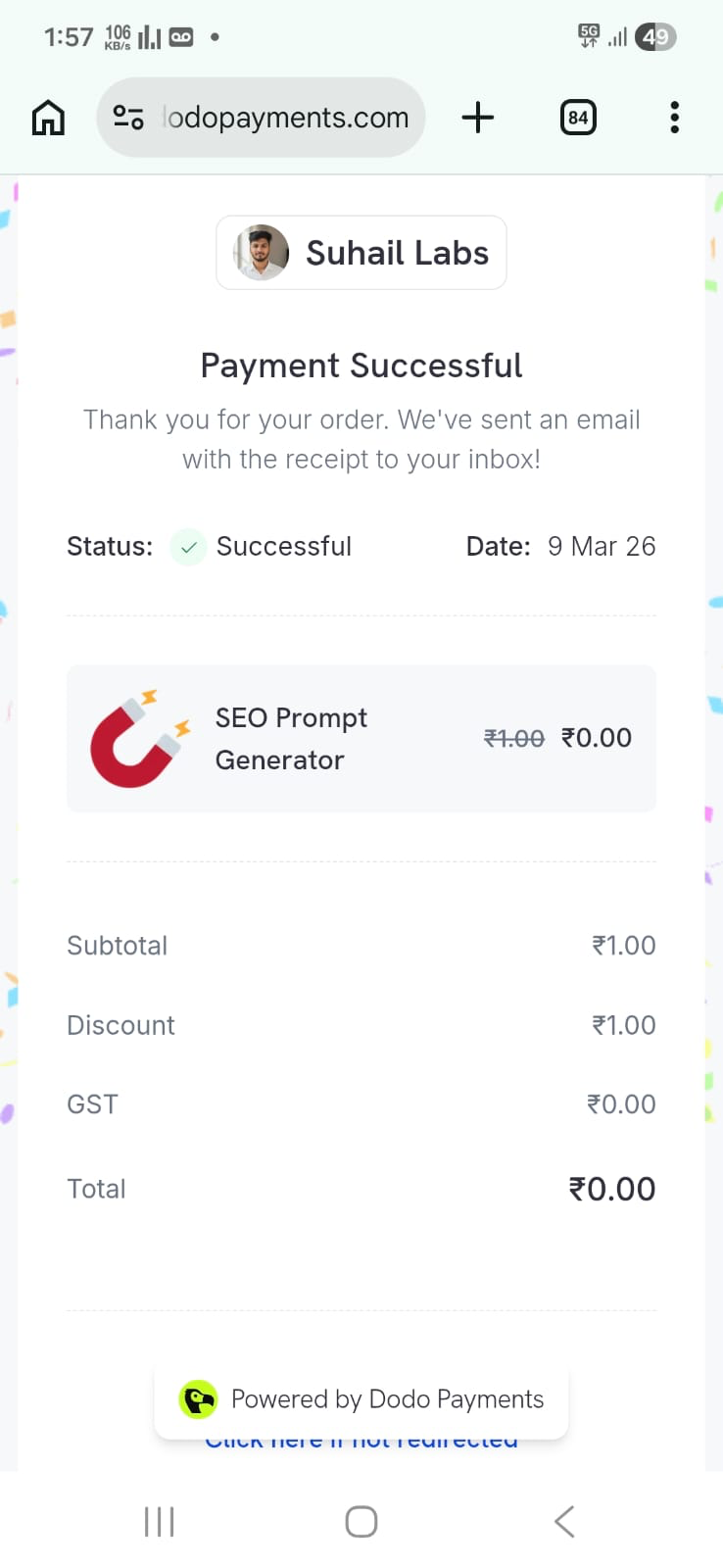
I see INR 1
Which it should be USD 1
or else INR 83 Rupees
Log in to comment and vote
No comments yet
Be the first to share your thoughts.